The NEX Book
NEX is a small interpreted programming language for learning the foundations of programming. It emphasizes explicit types, clear control flow, and predictable rules, so new programmers can focus on how values, variables, functions, and scope work together.
NEX is deliberately compact. It includes the core building blocks of programming such as integers, strings, booleans, variables, expressions, functions, and loops, but leaves out larger abstraction systems such as classes and first-class functions. That keeps attention on the basic patterns of programming and on how simple constructs can be combined to solve larger problems.
This book explains NEX as a language for learning. It aims to show not only what programs can be written, but also why they behave the way they do.
Here is a small complete program:
int x = 0;

while (x < 5) {
    print(x);
    x++;
}
Installation
Install NEX locally in editable mode:
python -m pip install -e .
Once published, NEX can also be installed from PyPI:
python -m pip install nex-lang
This installs the nexlang command-line runner. For example:
nexlang examples/hello.nex
The runner can also show intermediate views and execution timings:
nexlang tokens examples/hello.nex
nexlang ast examples/hello.nex
nexlang --times examples/hello.nex
nexlang run --times --color examples/hello.nex
Use --times to print a timing summary for lexing, parsing, interpretation,
and total execution. Add --color or -c if you want that timing table
highlighted with colors.
The reference chapters describe the language as it exists today. They focus on source-level behavior rather than interpreter internals, but they are written with implementation-minded readers in mind. When the implementation and the book disagree, that is a bug to fix rather than a reason to guess.
When writing documentation, fenced ```nex
blocks are highlighted automatically. Inline snippets can also be highlighted,
but inline Markdown backticks do not carry language information. For inline NEX
syntax, use raw HTML such as
<code class=“language-nex”>arr.length()</code>.
The current implementation also provides structured diagnostics for lexing, parsing, and runtime failures. These diagnostics report the phase together with source line and column information when available, which makes NEX a better tool both for writing small programs and for studying how a language reports errors in a disciplined way.
Reference
This section describes the currently supported NEX language core. It is written as a language reference, but it is also meant to be readable by students who want to understand how the pieces of a programming language fit together.
The emphasis is on source-level behavior rather than implementation details. That means the chapters below describe what a NEX program means, what kinds of values it can manipulate, how scopes are formed, and what kinds of errors are part of the language contract. Unless noted otherwise, examples in this section are expected to work in the current interpreter.
Lexical structure
Source files
A NEX program begins life as plain text. Before the parser can understand statements and expressions, the lexer first breaks that text into tokens such as identifiers, keywords, literals, operators, and punctuation. This chapter describes the raw textual shape of the language: what counts as a comment, what counts as a name, and which symbols the lexer recognizes.
Whitespace is mostly insignificant in NEX. It is used to separate tokens when needed, but it does not change the meaning of the program by itself. Newlines do not terminate statements; semicolons do. This gives the language a simple, statement-oriented feel that is easy to tokenize and parse.
Comments
NEX supports line comments introduced by #. Anything from # to the end of
the current line is ignored by the lexer, which means comments are part of the
source text but not part of the program’s meaning.
int x = 1; # trailing comment

# whole-line comment
print(x);
Identifiers
Identifiers are used for variable names. In the current core, they are the names by which values are introduced into the environment and later looked up again in expressions and assignments.
An identifier may start with a letter or _. After the first character, it
may contain letters, digits, and _.
Identifiers and keywords are case-sensitive. For example, count, Count,
and COUNT are different names, and only lowercase print is the print
keyword.
Examples:
xcountermessage_namewith_internal_underscore
Keywords such as fn, return, void, int, bool, str, array, if,
else, while, for, true, and false are reserved. They have fixed
meaning in the grammar and therefore cannot be used as identifiers.
Literals
The current core supports three literal kinds. Literals are source forms that directly produce values without first looking them up from a variable:
- integer literals such as
0and42 - string literals such as
"hello" - boolean literals
trueandfalse
print(42);
print("hello");
print(true);
Punctuation and operators
The lexer recognizes the following punctuation and operators. Together, they define the basic shape of NEX expressions, declarations, blocks, and control flow:
(){};=+=-=*=/=^=+-*/%^&&||<><=>===!=!
Example:
int score = 10;

if (score >= 10 && score != 15) {
    print("good");
}
Grammar
Note for new readers: This chapter is included mainly to give a complete structural view of the language. You do not need to read the full grammar to start using or understanding NEX. If the notation feels unfamiliar, it is perfectly fine to skim this page and return to it later as a reference.
This chapter gives a compact view of the current NEX surface grammar. It is meant as a structural summary for readers who want to see how the language fits together after reading the surrounding reference chapters.
Like most practical parsers, NEX also has a few rules that are checked outside
the grammar itself. For example, return is only valid inside a function body,
and function declarations are accepted only at the top level of a program even
though the compact statement grammar shows them beside other statement forms.
Surface grammar
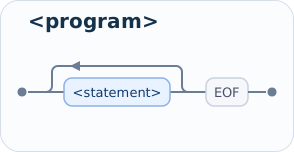
<program>           ::= <statement>* EOF

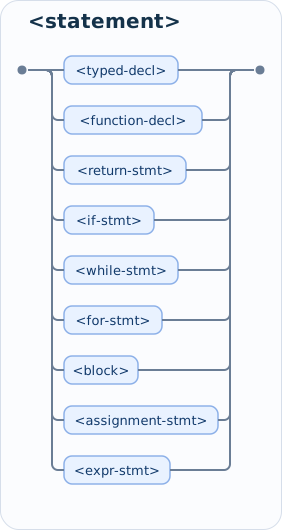
<statement>         ::= <typed-decl>
                      | <function-decl>
                      | <return-stmt>
                      | <if-stmt>
                      | <while-stmt>
                      | <for-stmt>
                      | <block>
                      | <assignment-stmt>
                      | <expr-stmt>

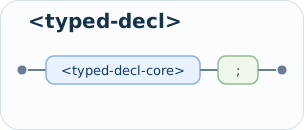
<typed-decl>        ::= <typed-decl-core> ";"

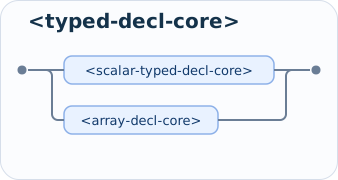
<typed-decl-core>   ::= <scalar-typed-decl-core>
                      | <array-decl-core>

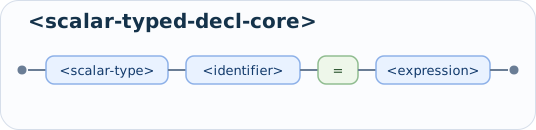
<scalar-typed-decl-core> ::= <scalar-type> <identifier> "=" <expression>

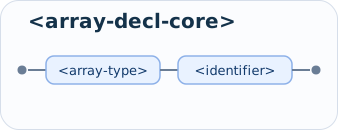
<array-decl-core>   ::= <array-type> <identifier>

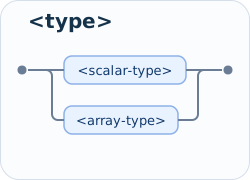
<type>              ::= <scalar-type> | <array-type>

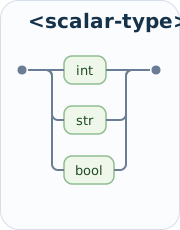
<scalar-type>       ::= "int" | "str" | "bool"

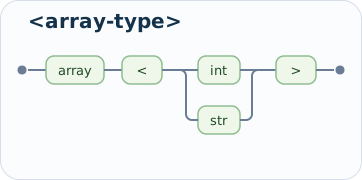
<array-type>        ::= "array" "<" ( "int" | "str" ) ">"

<function-decl>     ::= "fn" <identifier> "(" [ <parameters> ] ")" "->" <return-type> <block>

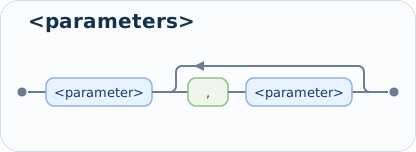
<parameters>        ::= <parameter> ("," <parameter>)*

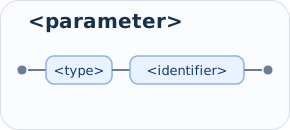
<parameter>         ::= <type> <identifier>

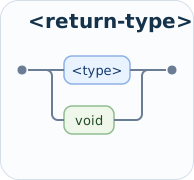
<return-type>       ::= <type> | "void"

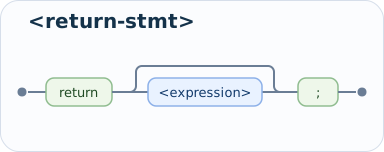
<return-stmt>       ::= "return" [ <expression> ] ";"

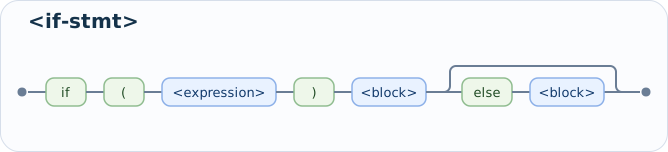
<if-stmt>           ::= "if" "(" <expression> ")" <block> [ "else" <block> ]

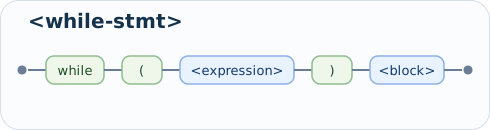
<while-stmt>        ::= "while" "(" <expression> ")" <block>

<for-stmt>          ::= "for" "(" <for-init> ";" <expression> ";" <for-iter> ")" <block>

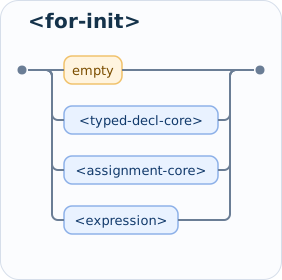
<for-init>          ::= empty
                      | <typed-decl-core>
                      | <assignment-core>
                      | <expression>

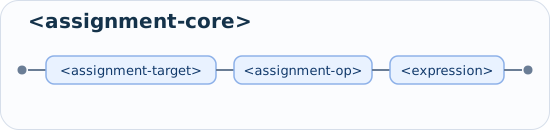
<for-iter>          ::= empty
                      | <assignment-core>
                      | <expression>

<block>             ::= "{" <statement>* "}"

<assignment-stmt>   ::= <assignment-core> ";"

<assignment-core>   ::= <assignment-target> <assignment-op> <expression>

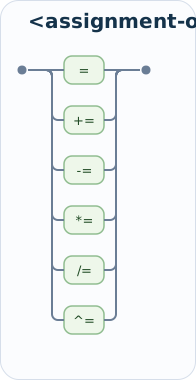
<assignment-op>     ::= "=" | "+=" | "-=" | "*=" | "/=" | "^="

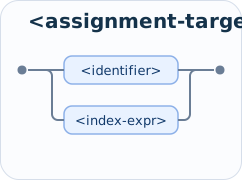
<assignment-target> ::= <identifier> | <index-expr>

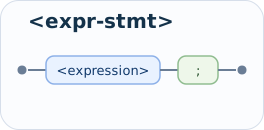
<expr-stmt>         ::= <expression> ";"

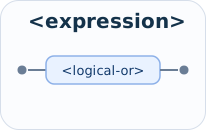
<expression>        ::= <logical-or>

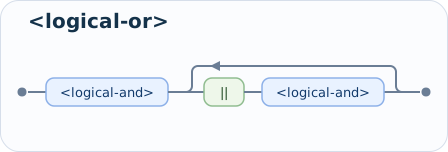
<logical-or>        ::= <logical-and> ( "||" <logical-and> )*

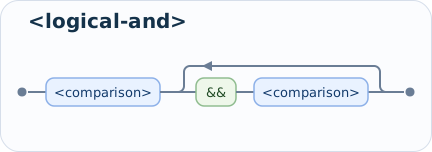
<logical-and>       ::= <comparison> ( "&&" <comparison> )*

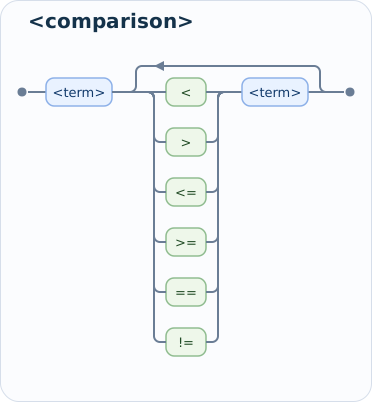
<comparison>        ::= <term> (( "<" | ">" | "<=" | ">=" | "==" | "!=" ) <term>)*

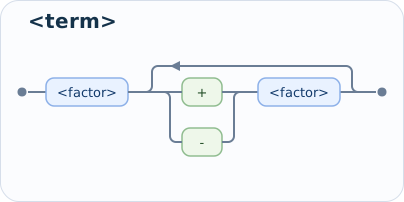
<term>              ::= <factor> (("+" | "-") <factor>)*

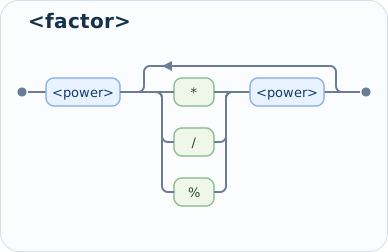
<factor>            ::= <power> (("*" | "/" | "%") <power>)*

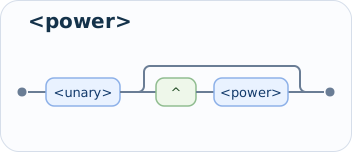
<power>             ::= <unary> [ "^" <power> ]

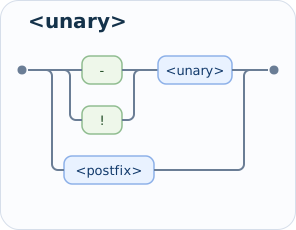
<unary>             ::= ("-" | "!") <unary>
                      | <postfix>

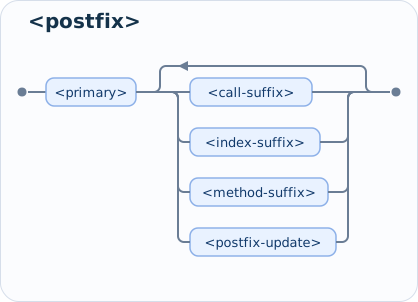
<postfix>           ::= <primary> ( <call-suffix> | <index-suffix> | <method-suffix> | <postfix-update> )*

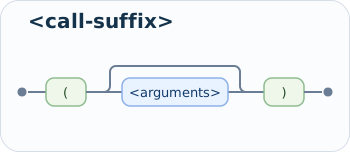
<call-suffix>       ::= "(" [ <arguments> ] ")"

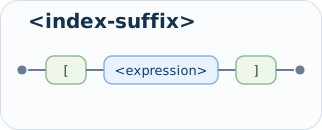
<index-suffix>      ::= "[" <expression> "]"

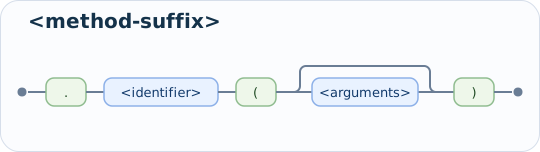
<method-suffix>     ::= "." <identifier> "(" [ <arguments> ] ")"

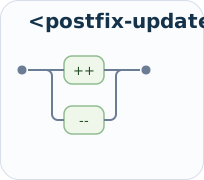
<postfix-update>    ::= "++" | "--"

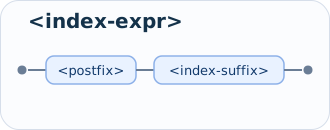
<index-expr>        ::= <postfix> <index-suffix>

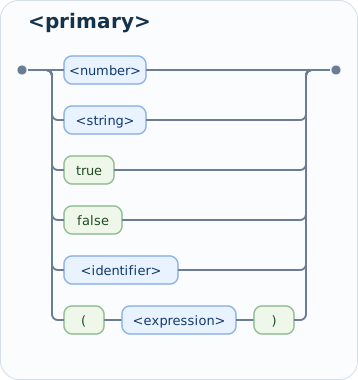
<primary>           ::= <number>
                      | <string>
                      | "true"
                      | "false"
                      | <identifier>
                      | "(" <expression> ")"

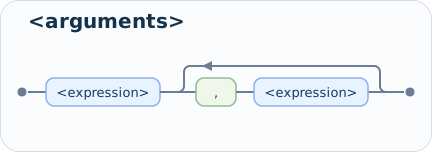
<arguments>         ::= <expression> ("," <expression>)*
Syntax diagrams
<program>
<statement>
<typed-decl>
<typed-decl-core>
<scalar-typed-decl-core>
<array-decl-core>
<type>
<scalar-type>
<array-type>
<function-decl>

<parameters>
<parameter>
<return-type>
<return-stmt>
<if-stmt>
<while-stmt>
<for-stmt>

<for-init>
<for-iter>
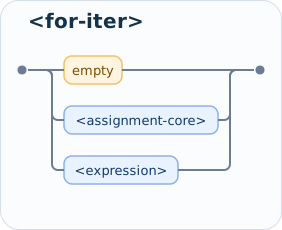
<block>
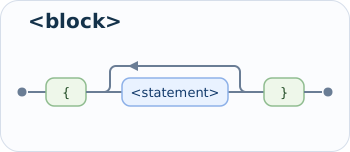
<assignment-stmt>
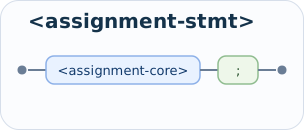
<assignment-core>
<assignment-op>
<assignment-target>
<expr-stmt>
<expression>
<logical-or>
<logical-and>
<comparison>
<term>
<factor>
<power>
<unary>
<postfix>
<call-suffix>
<index-suffix>
<method-suffix>
<postfix-update>
<index-expr>
<primary>
<arguments>
Notes
- Function calls are postfix expressions, not statements in their own right.
That is why built-in functions such as
print(...)andinput()can appear in an initializer, inside another call, or as a plain expression statement. - Function declarations are top-level declarations. They are listed under
<statement>so the grammar can show their source shape, but declarations inside blocks or other functions are rejected by the parser. - Array declarations are syntactically distinct from scalar declarations:
array<int> arr;is valid, while array declarations with initializers are currently rejected. - Postfix
++and--are also part of the expression grammar. In the current implementation they are restricted to variable operands. - Postfix expressions now also include array indexing such as
arr[-1]and method-style calls such asarr.length(),arr.resize(3), orarr.reset(). forreuses declaration, assignment, and expression forms in its header, but without extra trailing semicolons inside those clauses.- The grammar allows repeated comparison operators syntactically. Runtime type rules still determine whether a particular chained comparison is meaningful.
- Logical operators are part of the expression grammar, with
&&binding more tightly than||.
For the meaning of each construct, the surrounding reference chapters remain the authoritative explanation. This chapter is mainly a compact syntax map.
Types and values
NEX currently has four first-class value categories:
intstrboolarray<int>/array<str>
Variables are declared with an explicit type and keep that type for their lifetime. That makes NEX an explicitly typed language core with strong runtime type checks. A variable is not just a name; it is a name bound to a value of a particular type, and later assignments must respect that binding.
This design keeps the language small while still illustrating an important concept in language implementation: values have kinds, and the interpreter must enforce the rules that say which operations are valid for which kinds of values.
Integers
int values are arbitrary-precision whole numbers. In other words, they are
not limited to a fixed 32-bit or 64-bit range.
int a = 10;
int b = -3;
print(a + b);
Integers support the usual arithmetic operators. In the current core, -, *,
/, and % are integer-only operators, while + also has a second meaning
for string concatenation. That split is intentional: it keeps the operator set
small while showing that the same surface symbol can have different meanings
depending on operand types.
Strings
str values are double-quoted text literals.
str left = "he";
str right = "llo";
print(left + right);
Strings can be concatenated with +, compared for equality, and also compared
with the ordering operators. This is a useful teaching choice because it shows
that not all comparisons are numeric: some values can be ordered
lexicographically.
Booleans
bool values are either true or false.
bool ready = true;

if (!ready) {
    print("wait");
} else {
    print("go");
}
Conditions in if, while, and for must evaluate to bool. NEX does not
use implicit truthiness. In other words, NEX does not silently treat integers
or strings as conditions. A condition must really be boolean, which keeps the
rules easy to explain and easy to check.
Arrays
NEX also supports typed arrays of integers and strings.
array<int> numbers;
array<str> names;
Array creation is currently always empty. Arrays therefore use declaration syntax without an initializer expression. This makes array declarations a small special case in the current language: unlike scalar declarations, they create a valid value directly without needing an explicit initializer.
Supported array types are:
array<int>array<str>
Elements are accessed with indexing syntax:
int first = numbers[0];
str last = names[-1];
Negative indices count from the back of the array. For example, arr[-1]
refers to the last element and arr[-2] to the second-to-last element.
Elements can also be updated with indexed assignment:
numbers[0] = 10;
names[-1] = "Ada";
Arrays also support resizing, resetting, and length queries:
numbers.resize(10);
numbers.reset();
int count = numbers.length();
These method-style calls are surface syntax for ordinary function calls. In
other words, numbers.resize(10) behaves like resize(numbers, 10), and
numbers.length() behaves like length(numbers). Likewise,
numbers.reset() behaves like reset(numbers).
Variable declarations
Scalar variables are introduced with an explicit type, a name, and an initializer.
int count = 0;
str name = "nex";
bool ok = true;
The initializer expression must evaluate to a value that matches the declared type. Redeclaring a variable in the same scope is a runtime error. Together, these rules make declarations do two things at once: they create a new binding and they immediately give it a valid initial value.
In other words, scalar declarations without an initializer are not part of the
current language. Forms such as int x;, str name;, and bool ok; are
rejected.
Array declarations are the exception:
array<int> arr;
They create an empty array value directly and do not use an initializer.
Assignment
Assignment updates an existing variable.
int x = 1;
x = x + 2;
print(x);
Compound assignment is also supported:
x += 2;
x *= 3;
x /= 2;
x -= 1;
x ^= 2;
These forms update the current value in place using the corresponding operator.
For example, x += 2; behaves like x = x + 2;.
Assignments must preserve the declared variable type. Assigning a str to an
int variable, for example, is a runtime error. Assigning to a variable name
that has not been declared is also a runtime error. This means NEX does not
allow assignment to invent new bindings implicitly; declarations and
assignments have separate roles.
Arrays extend assignment with indexed element updates:
arr[0] = 10;
arr[-1] = 99;
Compound assignment works with indexed targets too:
arr[0] += 10;
arr[-1] *= 2;
This syntax updates a slot inside an existing array rather than rebinding the array variable itself.
Expressions and operators
Overview
Expressions produce values. The current core includes:
- literals
- variable references
- parenthesized expressions
- unary expressions
- postfix expressions
- binary expressions
Expressions are the computational side of the language. They are the parts of a program that answer questions such as “what value does this literal have?”, “what value is stored in this variable?”, or “what is the result of combining these two operands with an operator?” In the interpreter, expressions are evaluated recursively, which is why precedence and grouping rules matter so much.
That said, “expression” in NEX does not mean “pure computation only”. An
expression always produces a value, but some expressions may also have side
effects while they are being evaluated. Function calls are the clearest example:
print("hi") is an expression even though evaluating it writes output. Postfix
++ and -- behave the same way: they produce a value and update a variable
as part of that evaluation. In other words, NEX currently allows impure
expressions.
Operator precedence
From highest precedence to lowest:
- primary expressions: literals, variables, parenthesized expressions
- postfix operators: function call
(...), index access[...], method call.name(...), postfix increment++, postfix decrement-- - unary operators:
-,! - exponentiation operator:
^ - multiplicative operators:
*,/,% - additive operators:
+,- - comparison and equality operators:
<,>,<=,>=,==,!= - logical AND:
&& - logical OR:
||
Binary operators at the same precedence level associate from left to right. This precedence structure is a compact way of saying which expression trees the parser is supposed to build when several operators appear together.
For example:
print(2 + 3 * 4);
print((2 + 3) * 4);
For comparison and equality operators, this left-to-right rule also applies to
chains. For example, 1 < 2 < 3 is parsed as (1 < 2) < 3, not as a special
“between” form. Since 1 < 2 produces a bool, the second < then attempts
to compare bool with int, which is a runtime error.
Postfix operators bind more tightly than unary operators. For example, -f()
is parsed as -(f()), not as (-f)(). Exponentiation binds more tightly than
*, /, and %, so 2 * 3 ^ 2 is parsed as 2 * (3 ^ 2). The ^
operator associates to the right, which means 2 ^ 3 ^ 2 is parsed as
2 ^ (3 ^ 2).
Postfix operators
The current postfix operators are:
- function call:
name(...) - index access:
arr[i] - method call:
arr.name(...) - postfix increment:
x++ - postfix decrement:
x--
Function calls are described in more detail in Functions And Return. The key idea here is that postfix operators attach to an already-parsed primary expression and therefore have the highest operator precedence in the language core.
Index access
Index access reads a value from an indexed receiver expression.
int first = arr[0];
int last = arr[-1];
Negative indices count from the back. This means arr[-1] refers to the last
element, arr[-2] to the second-to-last element, and so on.
Method calls
Method-style calls are postfix expressions attached to a receiver:
arr.resize(100);
arr.reset();
int size = arr.length();
This syntax is currently used for array operations such as resizing, resetting, and length queries.
Method calls in NEX use a uniform function call style. That means the receiver
expression becomes the first argument of an ordinary function call. For
example, arr.length() behaves like length(arr), and arr.resize(100)
behaves like resize(arr, 100). In the same way, arr.reset() behaves like
reset(arr).
Postfix increment and decrement
++ and -- currently require a variable operand of type int.
Examples:
int i = 1;
print(i++);
print(i);
The first print outputs the original value. After that evaluation finishes,
the variable has been updated by one. -- works the same way but subtracts one.
Because these operators update program state while also producing a value, they are impure expressions rather than pure arithmetic.
Unary operators
Numeric negation
Unary - requires an int operand.
print(-3);
Boolean negation
Unary ! requires a bool operand.
print(!false);
Using unary operators with the wrong type is a runtime error.
Arithmetic operators
Exponentiation
Binary ^ requires int operands on both sides.
print(2 ^ 5);
print(2 ^ 100);
The exponent must be non-negative. Negative exponents are rejected because the current arithmetic core only supports integer results.
-, *, /, and % require int operands on both sides.
print(8 - 3);
print(8 / 3);
print(8 % 3);
The current interpreter performs integer division for /.
More precisely, division truncates the result toward zero.
Addition
Binary + supports:
int + intstr + str
Mixed-type addition is not allowed. The interpreter does not try to guess what you meant by combining unrelated types. Instead, it reports a runtime error.
Examples:
print(3 + 4);
print("Hello, " + "NEX");
Comparisons
The operators <, >, <=, and >= support:
intcompared withintstrcompared withstr
Mixed-type ordering comparisons are runtime errors.
Because comparisons associate from left to right, chained comparisons do not have a special combined meaning.
print(1 < 2 < 3);
The example above is parsed as (1 < 2) < 3. The first comparison evaluates
to true, and the second comparison then fails because ordering comparisons do
not support bool operands.
Equality
The operators == and != require both operands to have the same runtime
type.
Examples:
print(4 == 4);
print("a" != "b");
print(true == false);
Mixed-type equality is a runtime error rather than automatically evaluating to
false. This keeps equality semantically strict and avoids surprising implicit
conversions.
Logical operators
The operators && and || require bool operands.
Examples:
print(true && false);
print(false || true);
print(true && (1 < 2));
Logical operators use short-circuit evaluation:
a && bevaluatesbonly ifaevaluates totruea || bevaluatesbonly ifaevaluates tofalse
This matters both for efficiency and for behavior. For example, false && missing() does not attempt to evaluate missing(), because the left-hand side
already determines the result.
Built-in functions
Built-in functions are names provided directly by the language runtime. They do not need to be declared before use.
Built-in functions behave like ordinary function calls:
- they are called by name with parentheses
- their arguments are evaluated before the call
- they may return a value
- they may also have side effects such as printing or reading input
Unlike user-defined functions, their implementation lives in the interpreter rather than in a NEX function body.
The any type shown above is not a general
source-level wildcard type. It is reserved for selected built-in functions such
as print(…) and
print_inline(…). User programs currently
declare parameters, variables, and return types with the ordinary concrete
types of the language.
General built-ins
print
print(any msg) -> void
print(…) evaluates its argument and writes
the resulting value followed by a newline.
print("hello");
print(1 + 2);
This is the main output function in NEX.
print_inline
print_inline(any msg) -> void
print_inline(…) writes its argument without
appending a newline.
print_inline("name: ");
print("Ada");
This is useful for prompts and inline output.
version
version() -> str
version() returns the interpreter version as
a string.
print(version());
input
input() -> str
input() reads one line of user input and
returns it as a string.
print_inline("What is your name? > ");
str name = input();
print("Hello, " + name);
If input cannot be read, execution stops with a runtime error.
intstr
intstr(int value) -> str
intstr(…) converts an integer value to its
string representation.
str count = intstr(42);
print(count);
strint
strint(str value) -> int
strint(…) converts a string to an integer.
If the string cannot be parsed as an integer, the result is
0.
print(strint("123"));
print(strint("nope"));
Array built-ins
resize
resize(array<int> arr, int size) -> void
resize(array<str> arr, int size) -> void
resize(…) changes the logical length of an
array in place.
array<int> nums;
resize(nums, 3);
When an array grows, new slots are filled with the default value for the array
element type. For array<int>, that value is 0. For array<str>, that
value is "".
This builtin can also be called with method syntax:
nums.resize(3);
length
length(array<int> arr) -> int
length(array<str> arr) -> int
length(…) returns the current logical
length of an array.
array<int> nums;
nums.resize(3);
print(length(nums));
print(nums.length());
The method-style and function-style forms are equivalent.
reset
reset(array<int> arr) -> void
reset(array<str> arr) -> void
reset(…) replaces every existing element
with the default value for the array element type.
array<int> nums;
resize(nums, 3);
nums[0] = 7;
nums[1] = 9;
reset(nums);
print(nums[0]);
For array<int>, the default value is
0. For
array<str>, the default value is "".
This builtin can also be called with method syntax:
nums.reset();
Notes
- Built-in functions are part of the runtime namespace, not special statement forms.
- Because function calls are expressions, a built-in function can appear in a variable initializer, inside another call, or as a plain expression statement.
- Method-style calls such as
arr.length(),arr.resize(3), andarr.reset()are alternative surface syntax for ordinary built-in function calls.
Statements and control flow
Statements
The current NEX core supports these statement forms:
- variable declarations
- array declarations
- assignment statements
- expression statements
- function declarations
return- block statements
ifandif ... elsewhilefor
Statements are the parts of a NEX program that do work at the top level of a block. While expressions compute values, statements use those values to declare variables, update state, print results, or choose which block of code to execute next. Every simple statement ends with a semicolon.
Function declarations are the exception to the usual block-level statement rule: they are accepted only at the top level of a program. They are described with statements because they appear in the program’s statement sequence, but they cannot be nested inside blocks or other functions.
With arrays, NEX now distinguishes between:
- scalar declarations, which require an initializer
- array declarations, which create an empty array value
Assignment statements
An assignment updates an existing binding:
x = x + 1;
NEX also supports compound assignment as shorthand:
x += 1;
x -= 2;
x *= 3;
x /= 4;
x ^= 2;
These forms assign the result of the corresponding binary operation back to the
same target. For example, x += 1; behaves like x = x + 1;.
Indexed targets support the same syntax:
arr[i] *= 2;
Blocks
A block is a sequence of statements enclosed in braces.
{
    int x = 1;
    array<int> arr;
    print(x);
}
Blocks introduce a new lexical scope. This means they are not just a way to group statements visually; they also define where local variable bindings begin and end.
If statements
An if statement requires a boolean condition.
int temperature = 18;

if (temperature < 20) {
    print("cool");
} else {
    print("warm");
}
Using a non-boolean condition is a runtime error. NEX treats control-flow conditions strictly, which keeps the language behavior explicit and easy to reason about.
While loops
A while loop repeatedly executes its body while its condition evaluates to
true.
int i = 0;

while (i < 3) {
    print(i);
    i = i + 1;
}
Using a non-boolean condition is a runtime error. A while loop therefore
combines two important ideas at once: repeated execution and repeated
evaluation of a boolean expression.
For loops
The supported for form is:
for (initializer; condition; iteration) {
    /* body */
}
The initializer may be:
- empty
- a typed variable declaration
- an empty array declaration
- an assignment
- an expression statement form such as
1 + 2
The iteration clause may be:
- empty
- an assignment
- an expression statement form such as
i + 1
The condition is mandatory and must evaluate to bool.
Example:
for (int i = 0; i < 3; i += 1) {
    print(i);
}
The initializer and iteration clauses reuse statement-like forms, but they do
not carry their own trailing semicolons. The semicolons inside the for (...)
header already separate the three clauses.
These clauses may also use expression forms, though that is usually most useful when the expression has a side effect. For example:
int i = 0;

for (print_inline("start "); i < 3; print_inline(".")) {
    print(i);
    i = i + 1;
}
Using a non-boolean for condition is a runtime error. The current for
design is intentionally narrow, but it already shows the classic three-part
loop structure: setup, test, and update.
Functions
Function declarations and return statements are also part of the current
statement system. They are described in more detail in
Functions And Return, but the short version is:
fn ... { ... }introduces a named top-level function- function calls are expressions
returnstops the current function and optionally returns a value
That split is useful to keep in mind. Declaring a function is a statement, but
calling one is an expression. Function declarations cannot appear inside an
if, while, for, plain block, or another function body.
Built-in functions such as print(...) are described separately in
Built-in Functions.
Array operations in statements
Array syntax appears in both statements and expressions:
array<int> arr;
arr.resize(3);
arr.reset();
arr[0] = 10;
int last = arr[-1];
Here:
array<int> arr;is a declaration statementarr.resize(3);is an expression statementarr.reset();is an expression statementarr[0] = 10;is an assignment statementarr[-1]is an expression used inside an initializer
Functions and return
Functions let you give a name to a reusable piece of computation. They can take typed parameters, execute a block of statements, and optionally return a value.
In a small language like NEX, functions are especially useful because they show several ideas at once:
- naming behavior
- introducing local parameters
- checking argument and return types
- stopping execution early with
return
Function declarations
A function declaration has four parts:
- the
fnkeyword - the function name
- a parameter list
- a return type followed by a block body
The general form is:
fn name(type1 arg1, type2 arg2) -> return_type {
    /* body */
}
Example:
fn add(int a, int b) -> int {
    return a + b;
}
Parameters are typed, just like variables. That means a and b are local
names that exist only inside the function body, and each one has a declared
type.
Function declarations are top-level declarations. They cannot be written inside
an if, while, for, plain block, or another function body.
fn top_level() -> void {
    print("ok");
}
This is invalid:
if (true) {
    fn nested() -> void {
        print("not allowed");
    }
}
The special any type is not part of the ordinary user-facing function type
system. It is reserved for selected built-in functions such as print(...),
where the runtime intentionally accepts values of different concrete types.
Calling functions
A function call uses the function name followed by parentheses.
print(add(2, 3));
Arguments are evaluated first, then checked against the declared parameter types of the function. If the number of arguments is wrong, or if one of the argument values has the wrong type, execution stops with a runtime error.
Function calls are expressions. That means a call can appear anywhere an expression is allowed:
int x = add(2, 3);
print(add(4, 5));
add(1, 2);
The last example is valid even though its result is ignored. It is simply an expression statement whose expression happens to be a function call.
Because function calls are expressions, they can also participate in impure
evaluation. For example, a call such as print("hello") both produces a value
(void) and performs an observable side effect by writing output.
Function scope
User-defined functions are top-level declarations. NEX does not have closures, so a function call does not capture or borrow local variables from the block or function that called it.
When a function runs, it can access:
- its own parameters and local variables
- global variables that exist when the function body is executed
- globally declared functions that exist when the call is executed
This means a function can observe the current value of a global variable:
int y = 2;

fn show() -> void {
    print(y);
}

show(); # 2
y = 3;
show(); # 3
A function can also update a global variable:
int count = 0;

fn bump() -> void {
    count += 1;
}

bump();
print(count); # 1
But a function cannot see a caller’s local block variables:
fn show() -> void {
    print(y); # runtime error: y is not global or local to show
}

if (true) {
    int y = 2;
    show();
}
The same rule applies when one function calls another. The called function does not see the caller’s local variables:
fn show() -> void {
    print(x); # runtime error
}

fn caller() -> void {
    int x = 2;
    show();
}

caller();
Return values
Every function declares a return type after ->.
fn greet() -> void {
    print("hello");
    return;
}
fn square(int x) -> int {
    return x * x;
}
NEX currently supports these return types:
intstrboolarray<int>array<str>void
A void function does not produce a usable value. It may use plain return;
to stop early, or it may reach the end of the body normally.
A non-void function must return a value of the declared type. Returning the
wrong kind of value is a runtime error, and falling off the end of a non-void
function is also a runtime error.
Return statements
A return statement stops the current function immediately.
fn abs(int x) -> int {
    if (x < 0) {
        return -x;
    }
    return x;
}
This is an important rule: return is allowed anywhere inside a function body,
including inside nested if, while, for, or plain block statements that
belong to that function.
For example:
fn first_positive(int x, int y) -> int {
    if (x > 0) {
        return x;
    }
    if (y > 0) {
        return y;
    }
    return 0;
}
Using return outside a function is a parse error.
Rules
NEX follows these rules for functions:
- functions may share a name if their parameter-type signatures differ
- parameter names must be unique within one function
- functions must be declared at the top level; nested function declarations are not allowed
- a function must be declared before it is called
- functions do not capture caller locals; they can access only their own locals and the live global scope
- calls must provide the correct number of arguments for some matching overload
- each argument must match the declared parameter type of the selected overload
- non-void functions must return a value of the declared type
returnis only allowed inside a function body
These rules keep function behavior explicit. That makes the language easier to teach and easier to reason about, because the interpreter never has to guess what a call or return statement was supposed to mean.
When several overloads share the same name, NEX resolves the call using the argument count and argument types.
That means the following program is invalid:
hello();

fn hello() -> void {
    print("hello");
}
Instead, declare the function first:
fn hello() -> void {
    print("hello");
}

hello();
Scopes and bindings
Lexical scope
NEX uses lexical scoping with nested block environments. In a lexically scoped language, the meaning of a variable name depends on where that name appears in the source program, not on some dynamic history of how execution arrived there. User-defined functions are top-level declarations, so function calls use the function’s own local scope together with the live global scope; they do not capture or borrow caller-local scopes.
Each block creates a new scope. Variables declared in an inner scope can shadow variables from an outer scope, which means the inner binding temporarily hides the outer one while execution remains inside the block.
int x = 1;

if (true) {
    int x = 2;
    print(x);
}

print(x);
This prints:
2
1
Redeclaration
Redeclaring a variable in the same scope is an error, because one scope should not contain two competing bindings for the same name. Shadowing a variable in a nested scope is allowed, because the nested block is a distinct environment with its own lifetime.
For example, this is invalid because both declarations live in the same block:
int score = 10;
int score = 20;
Assignment lookup
Assignments search outward through enclosing scopes and update the nearest matching binding. Variable reads also search outward through enclosing scopes. This is a simple but important rule: lookup starts locally and only falls back to outer scopes if the current one has no matching name.
int total = 1;

{
    total = total + 2;
    print(total);
}

print(total);
This prints:
3
3
Assigning to an undefined variable is an error, and reading an undefined variable is a runtime error. These checks keep the environment disciplined and prevent names from appearing “by accident” during execution.
Function scope
Functions can read and update globals because globals are part of the scope available when the function body executes:
int total = 1;

fn add_one() -> void {
    total += 1;
}

add_one();
print(total);
This prints:
2
Functions do not capture local variables from the block or function that calls them:
fn show() -> void {
    print(local);
}

{
    int local = 3;
    show(); # runtime error: local is not visible inside show
}
For-loop scope
The current interpreter gives each for loop its own scope.
That means a variable declared in the initializer is available in the condition, iteration clause, and loop body, but does not leak outside the loop.
for (int i = 0; i < 2; i = i + 1) {
    print(i);
}
After the loop finishes, i is no longer defined. This makes for loops a
useful example of how a language can give a syntactic construct its own local
environment.
Diagnostics and errors
NEX reports failures in three main phases:
- lexing
- parsing
- runtime evaluation
The command-line runner reports these as:
lex error: ...parse error: ...runtime error: ...
This separation matters for learners. A lexing error means the raw text could not even be tokenized correctly. A parse error means the tokens were valid, but they did not form a sentence that matches the grammar. A runtime error means the program was syntactically valid, but something about its execution violated the language rules.
Source locations
When a source location is available, diagnostics include the line and column:
parse error: line 1, column 9: expect ';'
The current implementation reports source positions using the start of the relevant token or expression. That choice makes diagnostics easier to relate back to the program text, since the reported position points to where the problematic construct begins.
Message style
Diagnostic messages in the current core follow a simple convention:
- lowercase wording
- no trailing period
- source position handled separately from the message text
This convention keeps diagnostics short and regular. The exception object contains the message and the source location, while the CLI decides how to add the phase prefix.
Examples:
lex error: line 1, column 1: unexpected character '@'
parse error: line 1, column 14: expect ')'
runtime error: line 3, column 17: cannot assign value of type str to variable 'x' of type int
Parse errors
Parse errors describe violations of the grammar, such as:
- missing semicolons
- missing closing parentheses
- invalid
forinitializer clauses - missing expressions
These are errors in the shape of the program. They tell you that the parser cannot build a meaningful abstract syntax tree from the given tokens.
For example, this program is missing a semicolon after the declaration:
int x = 1
print(x);
Runtime errors
Runtime errors describe programs that are syntactically valid but semantically invalid at execution time, such as:
- using an undefined variable
- assigning a value of the wrong type
- calling a function with the wrong number of arguments
- calling a function with arguments of the wrong type
- returning a value of the wrong type from a function
- using a non-boolean condition in
if,while, orfor - applying an operator to unsupported operand types
- writing a chained comparison such as
1 < 2 < 3, which becomes(1 < 2) < 3
These are errors in the meaning of the program as it runs. They are especially valuable in a small interpreter because they show how a language can stay simple while still enforcing strong semantic rules.
For example, this program is syntactically valid but tries to assign a string to an integer variable:
int count = 3;
count = "three";
Stability note
The exact wording of diagnostics may still evolve, but line/column reporting and phase-specific CLI errors are now part of the intended user experience of the current NEX core.