MSDOS KAKURO

RETROCOMPUTING · GAME DEVELOPMENT

Kakuro for MS-DOS.

A number puzzle game written in Borland C++ 3.1, with a custom VGA graphics engine and 96 puzzles. This project explores game development for 8086/8088 systems: drawing in planar video memory, packing assets, and working with period sound hardware.

The browser demo runs the DOS executable in a WebAssembly build of DOSBox. You can also download it for DOS, or explore the source and build tools.

Ready to start640 × 480 · 16 COLORS · VGA
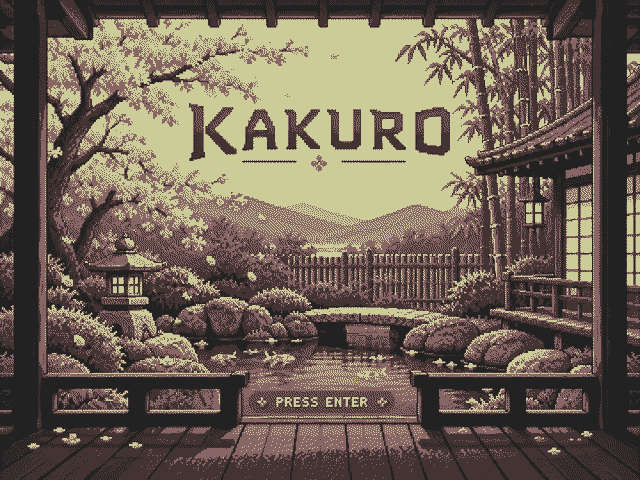
Pixel art of a peaceful courtyard with cherry blossoms and a wooden gate.

DOSBox / WebAssembly · Keyboard or touch controls

Click the game to focus. Enter opens puzzle selection.

GAMEPLAY

How Kakuro works

Kakuro is a crossword of sums. Each white cell belongs to a horizontal run, a vertical run, or both. Dark cells separate the runs; diagonal clue cells give their target sums.

  1. Fill the answer cells with digits 1 through 9.
  2. The number in the upper right of a clue cell is the sum of the run to its right. The number in the lower left is the sum of the run below it.
  3. A digit may appear only once within each run. It can appear again in a separate run.

Rose-brown answer cells contain fixed hints. They count toward the sums and cannot be edited. A puzzle is solved when every answer cell is filled and every run has the correct sum without repeated digits. The game accepts any solution that satisfies these rules.

USING THE GAME

Controls and puzzle selection

Keyboard controls
KeyAction
Arrow keysSelect a puzzle in the journal or move the board selector.
EnterOpen the journal, then start the selected puzzle.
PgUp / PgDnChange pages in the puzzle journal.
1–9Enter or replace a digit in an editable cell.
Backspace / Delete / 0Clear the selected answer cell.
EscClose a modal, return to the journal, or quit from the journal.
F1 / F2Open Help / About from the journal.
F3Open audio settings in the journal or a puzzle.

Choosing a puzzle

The journal shows each puzzle's dimensions and difficulty. Filled cherry blossoms indicate its difficulty level. Played and solved markers record your activity during the current session.

Session progress

Returning to the journal and reopening the active puzzle preserves your entries. Selecting another puzzle starts a fresh board. Entries and status markers are held in memory; restarting or closing the browser game clears them.

Click the game before using the keyboard. On smaller screens, the buttons below the display provide touch controls. Browser sound starts muted; use Sound off to enable it.

TECHNICAL NOTES

Inside the DOS game

C++ and the DOS toolchain

The game is a 16-bit real-mode DOS program, compiled with Borland C++ 3.1 for the 8086/8088 instruction set. A Docker environment runs the compiler through DOSBox and provides repeatable builds and headless tests.

The architecture separates VGA drawing, puzzle data, game control, menus and sound. The browser runs the same executable distributed in the DOS archive.

Browse the C++ source ↗

Planar VGA graphics

Standard VGA mode 12h provides 640 × 480 pixels and 16 colors. Pixels live in four bit planes. The graphics class writes directly to VGA memory and programs the palette through the DAC.

Bitmap fonts, compact clue digits and masked drawing routines keep the display readable. Selector movement redraws the affected borders; entering a digit redraws its cell. These choices reduce video-memory work on slower processors.

Read the VGA implementation ↗

Packed assets and puzzles

Graphics are stored in KAKURO.DAT, puzzles in PUZZLES.DAT, and audio in SOUND.DAT. The DOS distribution contains these packs alongside the executable.

The indexed puzzle archive encodes cells in five bits and uses byte run-length encoding when it saves space. Graphics also use run-length encoding. Python tools generate the packs from the editable source assets.

Read the puzzle packer ↗

Sound and browser emulation

The DOS sound class supports AdLib, Sound Blaster FM and MPU-401 General MIDI. MPU-401 playback needs a connected General MIDI synthesizer.

This website uses a self-hosted js-dos / DOSBox WebAssembly runtime to emulate the CPU, VGA and FM sound. Browser audio supports AdLib and Sound Blaster FM. Emulator downloads are pinned and checksummed when the site is built.

Read the website builder ↗
Automated tests exercise the DOS program under DOSBox and the browser game in Chromium. GitHub Pages builds reuse the tested DOS archive and run only on pushes to master.

BUILD AND RUN

Try it on DOS or build from source

The DOS archive includes the executable, all 96 puzzles, graphics, audio and font notices. Extract the files together and run KAKURO.EXE on an 8086 or newer with a VGA card.

Use make run for the local DOSBox version, or make site to generate this website. Build instructions and tests are documented in the developer guide.

Download DOS archive ↓